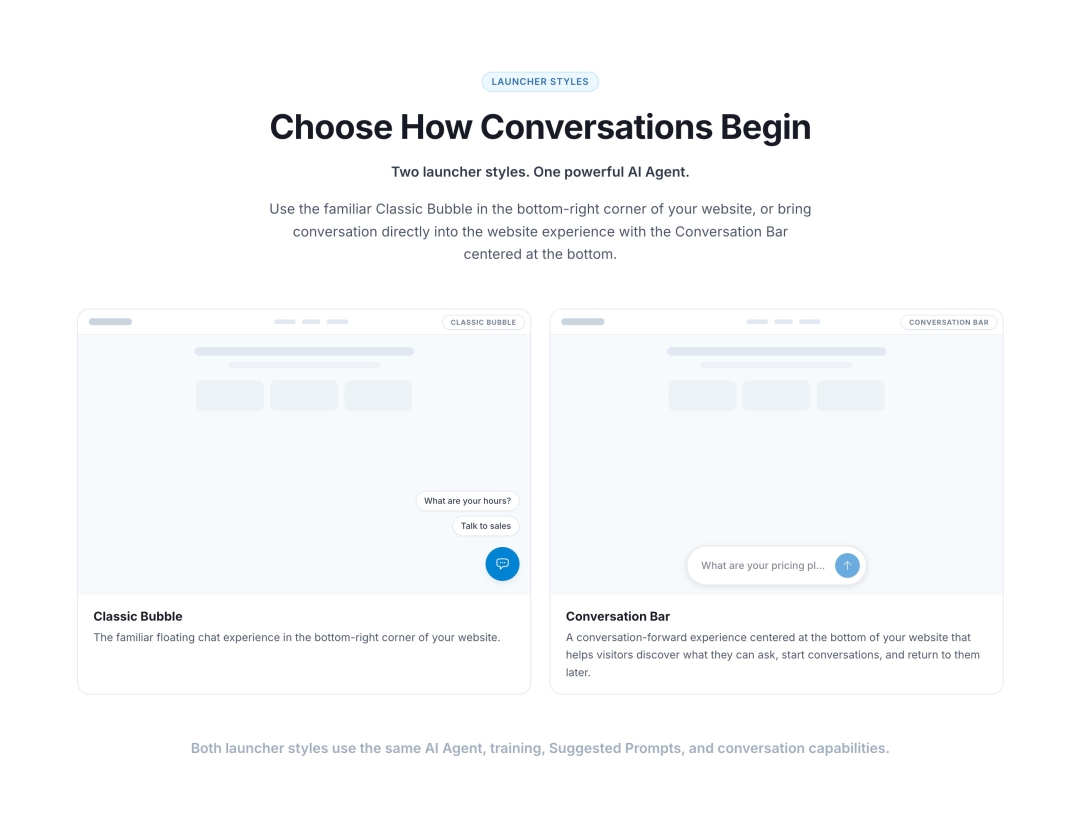
SAN DIEGO, Calif. - July 7, 2026 - ChatSpark, an AI-native customer service platform, today announced Conversation Bar, a new website launcher experience designed specifically for conversational AI Agents.
Centered at the bottom of a website, Conversation Bar gives visitors a persistent way to discover what they can ask, begin conversations, and quickly return to recent discussions without relying solely on the traditional floating chat button.
The launch reflects a broader shift in how businesses can deploy AI Agents on their websites. The familiar bottom-right chat bubble became standard during the live chat era, where its primary role was to signal that human support was available behind a button.
Conversational AI creates a different opportunity.
Modern AI Agents can answer questions, understand website context, guide visitors through decisions, and take action across connected business systems. Conversation Bar introduces an interaction model designed around those capabilities by bringing the opportunity to have a conversation directly into the website experience.
A New Way to Begin Conversations With AI
Conversation Bar appears as a persistent input-style interface centered at the bottom of a website. In its collapsed state, it cycles through Suggested Prompts that help visitors understand what they can ask before they decide to engage.
When clicked or tapped, the bar expands to reveal Suggested Prompts above an active input. Visitors can select a suggested topic or type their own question.
Once a conversation begins, the full conversation surface opens while Conversation Bar remains pinned at the bottom as the message composer.
The experience follows a natural progression from discovery to conversation:
Discover: The collapsed bar cycles through Suggested Prompts.
Explore: Clicking the bar reveals additional prompts and activates the input.
Ask: The visitor selects a prompt or types a question.
Converse: The full conversation opens with the bar remaining as the composer.
Return: After closing a conversation, the bar briefly offers a contextual way to reopen the recent discussion before returning to its normal prompt cycle.
Context-Aware Conversations Across a Website
Conversation Bar works with ChatSpark’s Per-Page Suggested Prompts, allowing businesses to adapt the conversational experience to the content a visitor is currently viewing.
A pricing page can surface questions about plans and free trials. A product page can suggest product-specific topics. A support page can highlight common help questions.
When a visitor navigates to a new page, Conversation Bar resets to show prompts relevant to the new context instead of continuing to display a reference to a conversation from a different page.
The result is a conversational entry point that can adapt as visitors move through a website.
Designed for New and Recent Conversations
Conversation Bar also helps visitors quickly return to a recently closed conversation.
After a conversation closes, the bar briefly displays a contextual continuation prompt, such as “Continue discussing pricing.” Clicking the bar reopens the recent conversation directly without requiring the visitor to send another message first.
After a short period, the bar returns to cycling Suggested Prompts. Navigating to a new page immediately resets the experience so the visitor sees prompts relevant to the new page.
This allows Conversation Bar to balance two goals: helping visitors quickly return to what they were just discussing and continuing to surface new opportunities for conversation as they browse.
Two Launcher Styles, One AI Agent
Conversation Bar expands the choices available to ChatSpark customers rather than replacing the existing experience.
Businesses can choose between two launcher styles:
Classic Bubble is the familiar floating chat launcher positioned in the bottom-right corner of the website. It remains the default.
Conversation Bar is a persistent conversational entry point centered at the bottom of the website.
Both launcher styles use the same ChatSpark AI Agent, training sources, Suggested Prompts, Per-Page Suggested Prompts, AI Actions, integrations, analytics, and conversation capabilities.
“The traditional chat bubble was designed for live chat. It tells visitors that support is available somewhere behind a button. Conversational AI gives us the opportunity to rethink that experience,” said Chris Robinson, Founder and CEO of ChatSpark. “With Conversation Bar, the conversation becomes part of the website itself. Visitors can immediately see what they can ask, explore relevant topics, and start interacting with the AI Agent in a way that feels native to the page.”
“We believe conversation is becoming the interface, and Conversation Bar brings that philosophy to the customer-facing experience,” Robinson added.
Part of the Broader ChatSpark Platform
Conversation Bar is part of ChatSpark’s broader approach to AI-native customer service.
The platform brings together AI Agents for automated customer conversations, AI Inbox for human handoff, AI Copilot for employee assistance, AI Operator for conversational management of customer service operations, and AI Actions that connect conversations to business systems.
Conversation Bar is available now. Businesses can experience it live on the ChatSpark website and learn more about ChatSpark AI Agents.
About ChatSpark
ChatSpark is an AI-native customer service platform that brings together AI Agents, human handoff through AI Inbox, employee assistance through AI Copilot, conversational operations through AI Operator, and integrations with the business systems companies already use. ChatSpark helps businesses automate customer service, assist employees, and connect conversations to real business actions across websites and messaging channels. ChatSpark is headquartered in San Diego, California.
Media Contact
Company Name: ChatSpark
Contact Person: Chris Robinson
Email: Send Email
Address:1721 Paseo Ct
City: Ramona
State: CA
Country: United States
Website: https://chatspark.io/