Understanding how to perform an SPF record lookup and interpret its results is essential for maintaining robust email authentication, securing your domain name from email spoofing, and ensuring optimal email deliverability. This comprehensive guide details what a Sender Policy Framework (SPF) record is, outlines step-by-step lookup procedures, explains SPF mechanisms, analyzes common errors, and provides proven best practices for SPF record deployment and management.
What an SPF Record Is and Why SPF Record Lookup Matters
An SPF record is a specialized DNS TXT record that defines which mail servers are allowed to send outbound emails on behalf of your domain. The Sender Policy Framework is an email authentication protocol outlined in RFC 7208. SPF helps prevent email spoofing and reduces vulnerability to phishing attacks by allowing recipient mail servers to check sender legitimacy through SPF validation.
Conducting an SPF record lookup or using an SPF validator is crucial for several reasons:
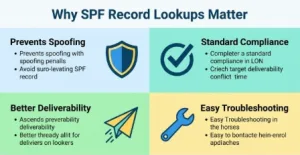
- Compliance with Email Standards: Many providers like Google (Gmail), Microsoft Outlook, and Verizon require valid SPF records for inbound email authentication.
- Preventing Email Spoofing: Proper SPF record deployment mitigates the risk of spam and malicious use of your domain.
- Enhancing Deliverability: Accurate configuration and regular SPF record check routines help ensure that legitimate emails reach the inbox and do not get flagged as spam.
- Troubleshooting: A routine SPF record check identifies configuration problems, SPF errors, or syntax issues that could otherwise result in a failed SPF status.
How to Perform an SPF Record Lookup Step by Step
Using Public SPF Lookup Tools and Methods
SPF record lookups can be performed manually or with the help of trusted online tools. Popular SPF diagnostic tools and platforms include EasyDMARC, MXToolbox, and proprietary validators from major cloud providers. These tools serve as a free SPF checker and provide actionable reports on the SPF status for a given domain name.
Manual SPF Record Lookup via Command Line
For administrators or advanced users, performing an SPF lookup from the command line can offer deeper insight. Here’s how:
On Windows (Command Prompt):
*nslookup* -type=TXT example.com
On macOS or Linux (Terminal using DiG):
*dig* TXT example.com
With these commands, you retrieve all TXT records, including the SPF record, linked to your domain.
Web-Based SPF Record Check
Online tools like the SPF Record Checker from MXToolbox or EasyDMARC’s SPF Validator can provide a full breakdown:
- Enter your domain name (e.g., yourbusiness.com).
- Run the SPF check via the provided interface.
- Review results for SPF policy details, syntax, and potential issues.
Step-by-Step Workflow for SPF Lookup
- Identify the domain name you wish to audit.
- Use your DNS hosting provider’s console or a third-party SPF lookup tool.
- Run the SPF check – the tool will perform the DNS lookup, retrieve the TXT record, and parse the SPF syntax.
- Review the SPF report to check for authorized senders, allowed IP addresses, and correct SPF tag usage.
- Document the returned results for ongoing SPF optimization and compliance.
Understanding SPF Lookup Results: Syntax, Mechanisms, and Qualifiers
Interpreting the results of your SPF diagnostic tool or validator requires fluency in SPF syntax and the mechanisms involved.
Key Components of SPF Records
SPF Syntax Basics
SPF records are formatted within the domain’s TXT record in DNS. For example:
v=spf1 ip4:192.0.2.10 include:_spf.*google*.com -all
- v=spf1 indicates the record uses SPF version 1 (the current standard).
- ip4 and ip6 specify allowed IP addresses.
- include tag references an external SPF policy (e.g., _spf.google.com).
- -all is a qualifier indicating that only listed servers are authorized senders.
Essential SPF Mechanisms
| Mechanism | Description |
| a | Authorize mail from IP of A record |
| mx | Allow sending from IPs of domain’s MX |
| ip4 | Authorize IPv4 addresses |
| ip6 | Authorize IPv6 addresses |
| ptr | Checks PTR record (rarely recommended) |
| exists | Pass if a domain resolves to an address |
| include | Import policy from another domain |
| redirect | Refer to a different SPF record |
SPF Qualifiers and Their Impact
Qualifiers (status operators) include:
- + (Pass): Allow listed IPs/machines
- – (Fail): Reject if matched
- ~ (SoftFail): Mark as “likely unauthorized,” deliver but flag
- ? (Neutral): No policy applied
For example, “-all” ensures strict SPF authentication policy enforcement, while “~all” offers softer compliance.
Deciphering SPF Validation Output
After running an SPF record check, you will encounter one of several results:
- SPF Pass: The source aligns with authorized senders or mechanisms in the SPF tree.
- SPF Fail: The IP address is not authorized per SPF policy.
- SPF Warning / Error: Issues like excessive DNS lookups or incorrect syntax detected.
Review the full SPF status in the validator’s report to see detailed path tracing, rule evaluation, and risk assessment.
Common SPF Issues Found During Lookup and How to Fix Them
SPF validation often uncovers recurring configuration problems that can hinder SPF compliance and pose security risks.
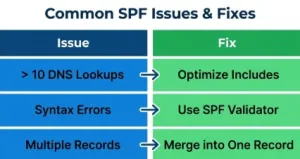
Excessive DNS Lookups
The SPF standard (RFC 7208) limits lookups to a maximum of 10 per SPF evaluation (e.g., across include tags, mx records, a records). Exceeding this may result in an SPF error and cause all checks to fail by default.
How to fix:
Optimize your SPF tree—remove unnecessary includes, group sender services under a single include where possible, and exclude unused senders.
Syntax Errors and Malformed Records
Common issues include missing required colons, invalid qualifiers, and duplicate mechanisms, which can produce a fatal SPF syntax error.
How to fix:
Always run new records through a reputable SPF validator or SPF diagnostic tool before publishing. Check for typos, ensure only one record per domain, and confirm adherence to standard SPF tags.
Multiple SPF Records
Multiple SPF records in one TXT field or more than one SPF record for a domain create ambiguity, leading to SPF authentication failure.
How to fix:
Merge all mechanisms and policies into a single SPF record per domain name.
Deprecated or Unsupported Mechanisms
Use of the ptr mechanism is discouraged and not supported by many MBP (mailbox providers) due to performance and security issues.
How to fix:
Use specific ip4 or ip6 addresses, a, or mx mechanisms instead.
Unaligned or Outdated Includes
Services like Microsoft’s Office 365 (spf.protection.outlook.com), Google Workspace (_spf.google.com), and EasyDMARC (_spf.easydmarc_us._d.easydmarc.pro) update their SPF include endpoints periodically.
How to fix:
Regularly review vendor documentation and update the include tag as necessary to maintain SPF compliance and service reliability.
SPF Record Best Practices to Improve Email Deliverability
Ensuring optimal SPF deployment is about more than avoiding errors—it’s about building on robust email authentication principles to maximize email deliverability and enhance SPF security.
Regularly Audit and Validate SPF Records
Schedule automated or manual SPF record check sessions using online SPF lookup tools such as EasyDMARC or MXToolbox. Document all SPF reports and monitor for SPF warnings or emerging compliance risks.
Minimize DNS Lookups and Flatten the SPF Tree
Where possible, consolidate include tags and avoid unnecessary levels of indirection. Use tools that help flatten the SPF record, reducing lookup count and improving DNS performance.
Keep Lists of Authorized Senders Up-to-Date
As new email services providers are added to your workflow (Amazon Web Services, for instance), always update your SPF record with the correct IP address or include tag. Remove obsolete senders after platforms are decommissioned to maintain a strong SPF policy.
Integrate SPF with DKIM and DMARC
For the highest level of email authentication and protection against phishing attacks, deploy a layered approach:
- SPF guards against unauthorized senders by IP address.
- DKIM (DomainKeys Identified Mail) validates message contents and sender cryptographically.
- DMARC (Domain-based Message Authentication Reporting & Conformance) provides reporting, enforcement, and alignment of SPF/DKIM with visible headers.
Monitor and Respond to SPF Authentication Results
Utilize DMARC reports and SPF validation logs from recipient MBPs to identify persistent SPF fails and troubleshoot according to spf status, qualifier, or error type.
Implement a Risk Assessment and Change Control Policy
Any DNS or SPF record change should go through internal risk assessment and approval workflows, especially when modifying domain registrar settings or integrating third-party sender services.
Maintaining rigorous SPF record lookup routines, ongoing validation, and proactive updates with SPF diagnostic tools will optimize both the deliverability and security of your outbound emails—and ensure your domain remains trusted within the global email ecosystem.